
Importing a CSV is only one step in a CRM migration. The harder work is deciding which data is trustworthy, preserving relationships between records, and proving that the new system supports the daily workflow. Use this plan whether your source is a spreadsheet, another CRM, or several disconnected tools.
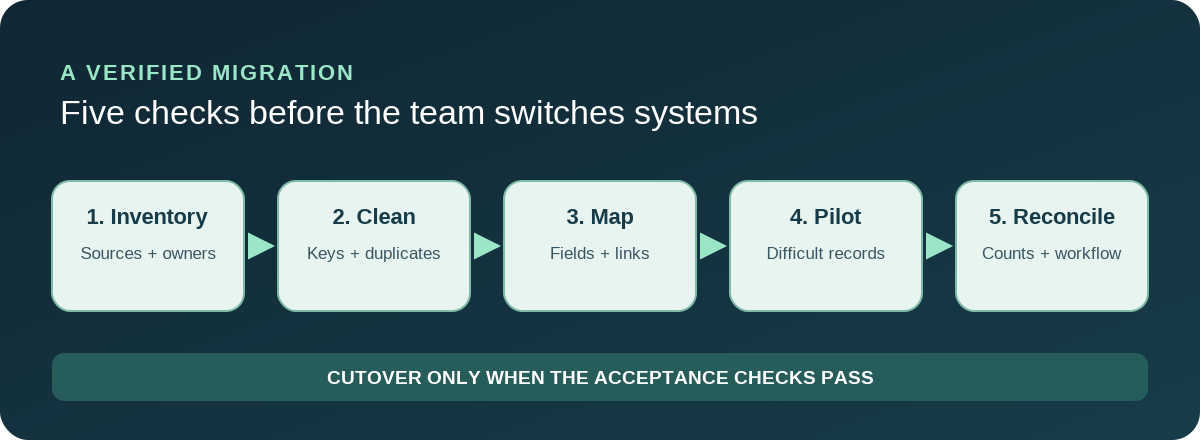
1. Inventory sources and choose an authority
List every source that can create or change a client record: spreadsheets, inboxes, forms, billing tools, marketing systems, and the old CRM. For each source, record its owner, object types, approximate count, last update, and whether it remains writable during migration.
Decide which source wins when values conflict. For example, billing may own legal company names while the sales spreadsheet owns the current deal stage. Record these rules before merging files; otherwise the import order silently becomes your data policy.
2. Clean and classify the data
Separate active contacts and opportunities from historical records that the team does not need in the new CRM. Keep an accessible archive of anything you must retain, but do not import every obsolete column “just in case.”
Normalize dates, country codes, names, deal stages, and owner names. Identify duplicates with a stable key where possible; a person’s name alone is not a safe identifier. Keep a list of ambiguous pairs for human review rather than automatically merging them.
Vendor behavior differs. HubSpot’s import guide explains how unique identifiers are used to update records and form associations. Pipedrive’s spreadsheet import guide describes field mapping, duplicate choices, an import summary, and skipped-row review. Zoho CRM’s import documentation describes matching existing records by a unique field. Choose the identifier appropriate to the destination and test it with your own sample; do not assume every CRM merges the same way.
3. Map objects, fields, and relationships
Make a mapping sheet with columns for source field, destination object and field, transformation rule, required status, and owner. Include contacts, organizations, deals, activities, notes, attachments, and custom objects only where the destination supports them and the business needs them.
| Source example | Destination question | Acceptance check |
|---|---|---|
| Contact email | Is it a reliable unique key? | Duplicate sample does not create an extra contact |
| Company ID | How will contacts and deals link to the company? | Sample relationships survive import and export |
| Deal owner | Does the owner exist and have access? | Every active deal has the intended owner |
| Stage and next action | Are values mapped or transformed? | Open deals appear in the right stage with a next step |
| Notes and attachments | Are they supported by this import path? | A representative sample remains readable |
Define how unmapped values are handled: reject, transform, archive, or enter manually. An empty destination field should be a deliberate decision, not a surprise after launch.
4. Pilot with difficult records
Import a small, representative batch before the full dataset. Include two contacts at one company, a possible duplicate, an inactive owner, a lost deal, a reopened opportunity, missing fields, unusual characters, and at least one record with notes or attachments.
Inspect the import preview, then compare the resulting records to the source. Review skipped rows and the import log. Ask a real user to find a client, complete a follow-up, and hand over a won deal. If those tasks fail, fix the mapping before scaling up.
5. Cut over with a stop rule and a backout plan
Choose a short cutover window. Freeze writes to the old source if possible, or record every change made after the final export. Keep a dated, access-controlled copy of the original data and the mapping sheet. Assign one person to approve the go/no-go decision and another to check the reconciliation.
Set acceptance criteria before the final import. An example for a small service team is: zero missing active deals, every active deal has an owner and next action, all pilot relationships verified, every skipped row explained, and no unresolved duplicate that changes client communication. Your criteria may differ, but they should be measurable.
If the criteria fail, stop new writes in the destination, document what was imported, and return the team to the previous working process while you repair the cause. Do not assume the vendor offers a simple “undo” for every import; test rollback options during the pilot.
Reconcile after import—not just row counts
Counts are necessary but insufficient. Compare records by type and status, then sample individual values and relationships. Check at least one record from each exception class. Reconcile the total number of active opportunities, ownership, stage, next-action dates, contact-company links, and the key reports the team uses.
Keep the old source read-only until the new CRM has produced at least one trustworthy reporting cycle. Then document where the archive lives, who can access it, and when it can be retired under your own retention policy.
The 30-day CRM pilot checklist puts the migration test in an adoption plan. Add migration effort to the CRM cost calculator before comparing products, and use the selection scorecard to rate data portability as part of the buying decision.
Source policy: Vendor-controlled import documentation linked above was reviewed on 24 October 2026. Import options, permissions, supported objects, and rollback behavior vary by product and plan. The sequence and acceptance criteria here are our editorial recommendations, not a claim that we performed a migration in your account.
The hero image is AI-generated and depicts a fictional workplace.